

January 30, 2020
Introducing Ayoa’s NEW side panel

We’ve given the humble side panel a revamp! With easy-to-navigate tabs and all the information you need just a click away, you’ll always be able to find exactly what you’re looking for.
New task side panel
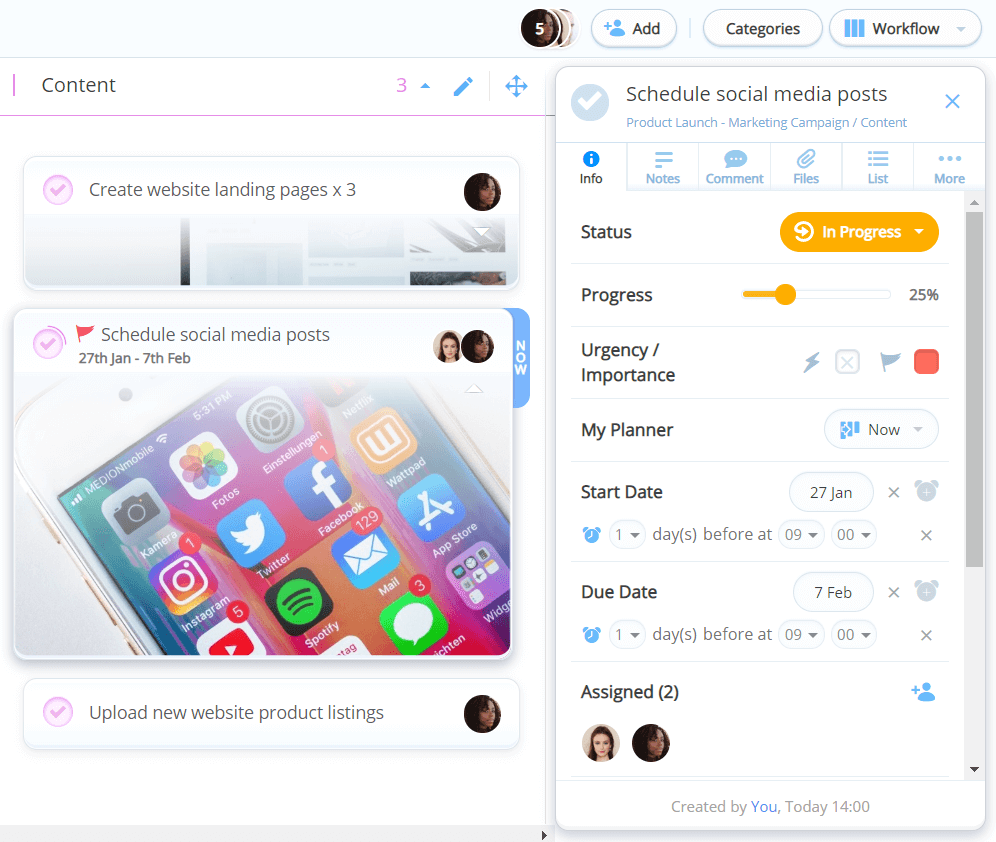
Navigating through your Task Boards should only fuel your productivity, not slow it down. With the brand new task side panel, you’ll be able to find all the relevant task details neatly stored across six tabs.
If you just want to see an overview of a task, simply view the ‘Info’ tab. If you want to find Notes, Comments, Files, Checklists and more, these are available in further tabs for when you need to delve into the details.
With Comments and Checklists in their own tabs, you’ll be able to discuss tasks and break down individual steps in as much detail as necessary, without the need for endless scrolling.
Brand new Task Status has also been introduced to allow you to indicate whether a task is ‘In Progress’, ‘On Hold’ or ‘Completed’ – so you and your team will always know what’s being worked on, and what needs addressing.
New Mind Map branch panel
The brand new branch panel takes Mind Mapping in Ayoa to another level. With everything you need clearly stored in one space, there’ll be no limits to your creative thinking power.
Simply click on a branch to open up the side panel, where you can easily edit the style and size of your branch bubble. Navigate to additional tabs (for Notes, Comments, Files, Tasks and more) for ideas that require a little more detail, discussion and context.

New Mind Map branch editor
The branch editor has also seen a revamp with one-click copy, cut, paste, and export options, so you can easily chop and change your map as you see fit.
…More to come!
Here at Ayoa, we’re continuously improving our software with updates and feature launches every month. If you’re excited to see what we’ve got lined up next, check out our Product Roadmap.
New to Ayoa? If you’re interested in trying out our Task Management and Mind Mapping software app, it’s free to sign up! Click here to get started.