

August 25, 2026 (Updated October 13th, 2026)
Ayoa vs MindView: Which Mind Mapping Software Should You Choose?

The short answer:
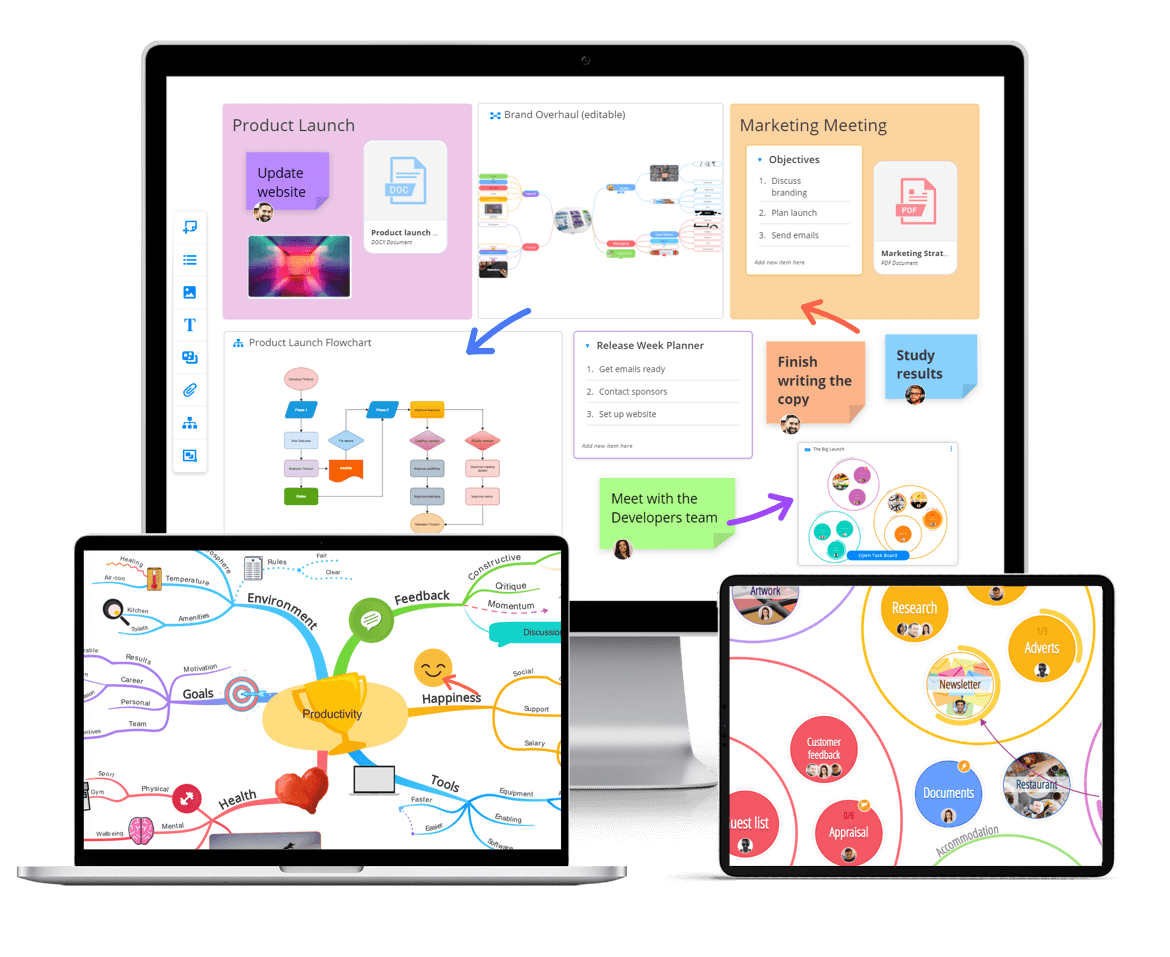
Ayoa and MindView both are primarily mind mapping tools with project management built in. MindView is a Microsoft Office-centric planning tool. Its maps are automatically laid out boxes and lines. Ayoa is a browser-based mind mapping platform built around Organic Mind Maps, where branches curve, taper and can be drawn freehand, and where the map itself is the finished output rather than a staging post.
At a glance

|

|
|
|---|---|---|
| Made by | OpenGenius | MatchWare |
| Mind map style | Organic Mind Maps with curved, tapering, freehand branches. Also radial maps and capture maps | Structured, automatically arranged boxes and connectors |
| Freehand drawing | Yes | Not a documented feature |
| Branch control | Curve any branch using control points, along with colour and shapes | Change branch shape, colour and boundary within the auto layout |
| Platforms | Web, iOS, Android, desktop (as a PWA install) | Windows desktop, Mac desktop, MindView Online |
| Task management | Kanban workflow, Canvas, Gantt timeline, dependencies, milestones, assignees, checklists | Task management system, interactive Gantt, resource calendars, MS Project sync |
| Real-time co-editing | Yes, on all maps, boards and whiteboards | Yes on Windows and Online via MindView Drive. |
| Whiteboards | Yes, infinite canvas with pen, shapes, sticky notes | No |
| AI | Prompt, document, audio and photo to mind map, plus in-map AI assistant | AI brainstorming, question generation, proofreading |
| Office export | Word, PowerPoint, PDF, PNG, JPG, OPM, including bibliography | Word with headings, contents and bibliography, PowerPoint, Excel, MS Project |
| Neurodiversity support | Dyslexia view, Lexend font, Neuro Settings, focus controls, dark mode, DSA Approved | MindView AT with JAWS, Dragon, DSA Approved |
| Price | Free plan, then Ayoa Ultimate from only $6.10 per month on a 2-year-plus-1-free deal. | MindView Suite $340 per year. Education and volume pricing on request |
Where the two products came from
MindView is a mature Windows application. It began life as desktop software in the Microsoft Office tradition, and it still shows that heritage in the best possible way. Version 9 uses an Office-style ribbon, exports beautifully to Word and PowerPoint, and round-trips schedules to Microsoft Project. MatchWare has kept it current, with a Windows update in January 2026 and a Mac update in July 2026.
Ayoa came from a different place. Chris Griffiths developed iMindMap with Tony Buzan, the inventor of the mind map, between 2005 and 2018, and brought the hand-drawn mind map into software for the first time in 2007. OpenGenius launched Ayoa in 2019 as the cloud successor to iMindMap. The design brief was never “how do we get this into Word”. It was “how do we keep what makes a hand-drawn mind map work, and add everything software can do on top”.
That difference in origin explains almost every difference in the two editors.
The mind map editor, compared
This is the section that matters most, because most people choosing between mind mapping tools are not really comparing feature lists. They are comparing what it feels like to think in the editor, and what the finished map looks like.
MindView: structured, tidy, automatic
MindView arranges your map for you. Topics radiate from the centre in a clockwise direction, and you reorganise by dragging a topic from one parent to another. You can change a branch’s shape, fill colour, boundary and text, and you can apply preset layouts and styles from the Design tab. There is a searchable picture panel and an icon panel, so images and symbols attach to topics easily.
What you cannot do is fully take over. The layout engine owns the geometry. You are choosing between presets rather than drawing. MatchWare publishes no hand-drawn or organic branch styling, and freehand drawing is not a feature anywhere in the MindView 9 documentation.
One of the two reviews on G2’s MindView 7 listing puts it plainly: “The color schemes are seriously lacking in variance and options.” It is a very small sample, but it is a fair description of a tool whose visual output is competent, consistent and slightly corporate.
Ayoa: organic, drawn, yours
Ayoa’s Organic Mind Maps are a registered trademark of OpenGenius, and they behave differently from anything in the structured diagram category. Branches curve rather than connect. Hover over a branch and control points appear, so you can bend it into the shape you want. Branch thickness varies, so a map tapers from a thick trunk at the centre to fine tips at the edges, which is exactly how a hand-drawn Buzan style map works and exactly what makes it readable at a glance. There is a freehand mode.
Ayoa also offers Auto Focus and Auto Layout for the moments when you want the software to tidy up, so the automation is available when it helps and out of the way when it does not. That is the right order of priorities for a creative tool.
The result is a map you would be happy to present or hand to a client without redrawing it in something else.
Why organic mapping is not decoration
It is tempting to treat curved branches and hand-drawn styling as cosmetic. The research on why mind mapping works says otherwise. Buzan’s method depends on visual distinctiveness: varying branch thickness to signal hierarchy, using colour and image to create memory hooks, and letting the shape of the map carry meaning. If you are mapping to organise information you already have, MindView’s approach is efficient. If you are mapping to generate ideas, remember them and communicate them, Ayoa’s approach does more work for you.
Task and project management, compared
MindView has real project management, not a Gantt-shaped decoration. It offers a work breakdown structure view, task dependencies, constraints, milestones, resource calendars, effort-driven scheduling and an interactive Gantt chart that updates as tasks change. It imports and exports Microsoft Project files on both Windows and Mac, and it integrates with Excel and Outlook on Windows. If your organisation runs on MS Project and you want the planning stage to happen in a map, MindView does that better than most mind mapping tools ever attempt.
Ayoa takes a different route. It offers three task board views from the same data: a Workflow Kanban view for linear process, a Canvas view where tasks appear as bubbles you can cluster and arrange spatially on an infinite canvas, and a Gantt Timeline with drag-and-drop scheduling, milestones and dependencies. Tasks carry start and due dates, urgency levels, an importance flag, progress percentage, assignees, checklists, notes, attachments, comments, tags and cover images. Branches convert straight into tasks, and chat messages can be dragged into tasks. My Planner sorts personal work into Now, Next and Soon.
The honest split is this. MindView is stronger for formal, scheduled, resourced projects that end up in Microsoft Project. Ayoa is stronger for teams who want to move from idea to execution in one place, in the browser, without a project manager translating between tools.
Platforms and collaboration
MindView’s platform story is uneven, and it is worth knowing before you buy.
The Windows build is the most complete. MatchWare’s Windows manual documents real-time collaboration through MindView Drive in detail. The Mac manual does not cover collaborative editing at all, so if co-editing on Mac matters to you, confirm the current position with MatchWare before you buy.
MindView Online, the browser version, is a reduced product. There is no Gantt chart, no timeline view, no resource management and no project reports, and export is limited to PDF, pictures, Word, PowerPoint and Google Docs rather than the full desktop export set. It does support start and end dates, task information, bibliography sources and real-time co-editing. TechRadar flagged the same gap in its review, noting the online version lacks features.
So the question with MindView is not “does it do this”, it is “does it do this on my platform”.
Ayoa has one product. The web app, the iOS app and the Android app work against the same account and the same maps, with real-time co-editing on mind maps, whiteboards and task boards, integrated chat, and mobile offline support with automatic sync. There is no feature cliff between platforms because there is only one build of the product. Ayoa does not currently ship a Windows or Mac desktop application, which will matter to organisations with strict offline desktop requirements. Ayoa has recently made a desktop version available, although this still requires the user to be online.
Accessibility, neurodiversity and DSA
Both companies take this seriously, and both are established in the UK Disabled Students’ Allowance market.
MindView AT holds a serious accreditation stack. It supports JAWS, SuperNova and ZoomText screen readers, integrates with Dragon Professional, and offers built-in text to speech and speech to text. MatchWare also publishes a DSA justification page and runs an assessors’ hub.
Ayoa approaches neurodiversity from the design side. There is a dyslexia view with adjustable background colours, the Lexend dyslexia-friendly font, controls to hide information and reduce distraction, keyboard speed keys, visual urgency and importance indicators, and Neuro Settings that tailor how the AI responds to you. The premise is that the interface itself should suit ADHD, dyslexic, autistic and dyspraxic thinkers, rather than being a standard interface with assistive technology bolted alongside. Ayoa is DSA approved and eligible under the UK Access to Work scheme.
If your requirement is screen reader and voice control conformance, check MindView AT carefully. If your requirement is a tool that neurodivergent people actually enjoy using every day, try both and let the user decide.
Who should choose which
Choose MindView if:
- Your finished output is a Word document, a PowerPoint deck or an MS Project schedule, and export fidelity is the whole point
- You run formal projects with resource calendars, effort-driven scheduling and constraints
- You are a Windows organisation and everyone is on Windows
- You need documented screen reader and Dragon voice control conformance
Choose Ayoa if:
- You want mind maps that look like mind maps, with curved, tapering, hand-drawn branches you control
- You want more control of the mind mapping experience
- You want mapping, whiteboards, task boards, Gantt, chat and AI in one app
- You are neurodivergent, or you support people who are, and you want the interface itself to be built for that
The verdict
MindView is a good product that is honest about what it is: a structured planning tool with exceptional Microsoft Office integration and real project management underneath. If that is the job, buy it.
But most people searching for mind mapping software want to think visually, and they want the thing they make to be worth looking at. On that measure Ayoa wins clearly. It is the only tool in this comparison where the branches curve, taper and can be drawn by hand, and that is not nostalgia. It is the reason mind mapping works.
Ayoa also brings task boards, Gantt, whiteboards and AI into the same subscription, on every platform. TechRadar rated Ayoa the best mind mapping software overall in its most recent roundup, and Zapier ranked it second, citing its mind mapping pedigree.
Frequently asked questions
Is MindView better than Ayoa?
MindView is better for Microsoft Office export and formal resource-based project scheduling, particularly for Windows organisations that run on MS Project. Ayoa is better for the mind mapping itself, for cross-platform teams, and for combining mapping with task management, whiteboards and AI in one browser-based tool at a lower price.
Does MindView do organic or hand-drawn mind maps?
No. MindView arranges maps automatically as structured boxes and connectors. You can change branch shape, colour and boundary, but MatchWare publishes no hand-drawn or organic branch styling, and freehand drawing is not a documented feature. Ayoa’s Organic Mind Maps use curved, tapering branches and support freehand sketching inside the map.
Does Ayoa work on Mac?
Yes. Ayoa runs in any modern browser on Mac, Windows, Linux or Chromebook, with full functionality and real-time collaboration, plus native iOS and Android apps. Ayoa is also now available on desktop. MindView has a Mac desktop build, though MatchWare’s Mac manual does not document real-time collaboration via MindView Drive, so confirm that with MatchWare if it matters to you.
Prices and product features in this article were checked in August 2026. Competitor pricing and features change, so check the vendor’s own pricing page before purchase.
Get started with Ayoa
Ayoa seamlessly blends idea generation, task management and team collaboration features to help you achieve your best work.
Try it for free