

June 30, 2016
Coming soon, in DropTask 2

*PLEASE NOTE – DropTask is now Ayoa – an all-in-one tool for idea generation and collaboration, that goes beyond traditional task management. Discover Ayoa and achieve your best work.*
Over the past year we’ve been working behind the scenes to bring you a brand new version of DropTask – and we’re so excited to share what’s on the horizon.
Complete with a beautiful redesign and a whole host of powerful new features and abilities, DropTask 2 takes things to the next level so you and your team can come together and achieve anything. The visual nature of our brand new Workflow Boards are perfect for agile working methods such as Kanban, and the vertical swimlanes make transitioning through stages within a project a total breeze.

If you’re already a user of DropTask, you’ll know that we love the simplicity that visuals can offer, over a long (and often uninspiring) list of to-dos. So, in DropTask 2 we’ve made way for a cleaner (and clearer) way of working with all-new eye catching icons and a palette bursting with color. In fact, we’ve applied the same concept to our UI, our new Notification Centre, and even the workspace Canvas – so you only see the things that you want and need to see. And as if that wasn’t enough, we’re also excited to introduce the brand new DropTask Calendar.
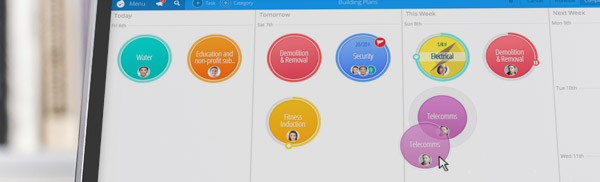
Strengthening your ability to plan and organize – which is key for producing those all-important deliverables on time, the new built-in calendar let’s you focus on what you should be working on today, and what’s due in the future. We know the nature of unexpected interruptions and the impact they can have on your day too, so we’re making sure that you can easily reschedule if your priorities need to change.
DropTask 2 is shaping up to be really special and this is just a teaser of what’s to come. To learn more, we’d like to invite you to participate in our beta program where you can contribute towards development testing and get early access before the official release. To take part, simply drop us an email at support@droptask.com and we’ll see what we can do.
New to DropTask? Learn more about the benefits by signing up for a free account today.
Hi Do you have an estimated date for the roll out of Drop Task 2? Only asking because in October 2015 you announced big changes were coming soon and now you are are announcing Drop Task 2 is coming soon, is it likely to be this year?
Hey Tracie. Sorry for any miscommunication, the app has been in beta for several months while it’s been thoroughly tested by our group of beta participants and timescales can sometimes vary around this. We’re just weeks away now – can’t wait! 🙂
Can’t wait! Chomping at the bit! 🙂 Been playing with the beta and it looks great.
Thanks Gunnar, great to hear you like it! 🙂
I would really wish for something that rates an idea of someone or a comment about a task or project with like button or calp or love logo, favor it for example, it shows votes that help understand what to listen to.
Wish to find that on droptask 2
Thanks for the suggestion Ibrahim! We’re actually working on something similar for an upcoming update : )
Please do not remove priorities for urgency and importance or the list view.
These features are really good and feel I cannot update to try the new one to try the new workflow if I cannot go back so looks like I will be sticking with v1.
Seconding Matt. Those are crucial features!
When will there be an iOS version?
Hi Mark, please find that DropTask is now available on Desktop, iOS and Android 🙂
Hello, I use the beta version and miss the function export to CSV files. Is there any date for inclusion?
Best regards.
The export to CSV feature will be added in an update that’s coming very soon.
Sounds like the upcoming list view is going away (by due date). Please make sure we have a simple list view for those that we assign specific project duties to, they only need to see what is assigned to them and the by due date with the ability to “check off” completion when done. This feature really make my management of projects more efficient. I can see what is due today or past due and address them if the assigned person didn’t complete. Kinda our safety net. How will this change? This concerns us.
Hi Stuart, I hope that I can put your concerns to ease.
The List View has been removed from DropTask to provide more of a visual focus on each of your projects. As a result, we have introduced a Workflow View as well as a DropTask Calendar to assist you with scheduling and time management, and I would be happy to assist you in getting the most from these features so that DropTask can continue to meet your needs. May I ask if you could get in touch at support@droptask.com, with details on how you were previously using the list view?
Our new Workflow View allows the ability to view projects in more of a linear fashion, but with the added ability to set up a project cycle so that tasks can flow through several stages with ease. This will help with limiting the amount of work ‘in progress’, so you can focus more on the on-going completion of tasks.
With added emphasis on time management and scheduling, the new Calendar allows you add Start and Due dates to your tasks, so that they can be scheduled
for completion. This will help to see what needs to be completed today,
tomorrow, and in the days to come, so you can avoid missing any important
deadlines.
I second the comment on urgency and importance. Changing importance so it’s an on/off flag, and demoting urgency so it’s merely a tag entry is a huge step backward for those of us that want (and are still waiting for) a priority (or Eisenhower) matrix. Also, the list view was the closest thing we had to that, and you’ve gotten rid of that, too. Features for agile work are great, but not all of us organize our work that way. Please bring back urgency + importance, and the list view of tasks. For GTD (Getting Things Done) organization, it’s a must. Thank you.
Hi Christian, thank you for your feedback.
I’m pleased to announce that multiple levels of importance will be added to DropTask in an update that we’ll be rolling out this week. Urgency may be set using our Tags feature, which can be filtered across all views. Tags also work well for placing tasks into their context if you’re using DropTask with the GTD concept.
I really hope this is just a product of the rollout timing and that you will be adding the functions we need in the near future. I don’t think it is, though, since it looks like the help pages related to exporting have all been removed.
I, for one, am extremely unhappy. You had a lengthy beta test period in which lots of useful feedback was given, and it appears you’ve ignored some of the most important items. You are collecting monthly charges for a service that you have just made substantially harder to use.
Not only have we lost the ability to view a simple list of all tasks (something the beta group mentioned multiple times, and DT ~very confusingly~ always resisted), but we aren’t even allowed to export our own projects now. And no, I do not consider the option to export my data to a proprietary file format, which requires purchasing a separate subscription to a separate service, as an actual export solution.
DT is essentially forcing us to buy imindmap access. This is super shady from a business/client service perspective. If you had even made it clear to us that exporting to csv/xls would no longer be an option, I would have exported all my projects immediately. Now I feel like I can’t even cancel my (Pro/Business) account because I don’t have a way to view all the tasks I created.
Hi Jen,
The export function to CSV will be made available in the very near future, as we continue to roll out updates to the app across various platforms. We apologise for any temporary inconvenience that this may cause. If you would be able to contact us at support@droptask.com, our team will be able to help further.
Kind regards,
Yogi
Please return back the list view and priorities (importance and urgency) – the features I used the most. The workflow view is not convenient at all.
Thank you.
where are the list view??? where are the inbox – and the priorities – Urgency??? without this features – it a noGo.sorry.
thanks
Just about to sign uup to drop task and saw this info about drop task 2. Will my membership be carried over to the new version or do i have to pay additional fees?
Also does the new version integrate with outlook (office 365) calendar?
Regards John
Hi John,
When you sign up to DropTask you will have access to all of the new features listed in this table, according to the plan that you choose: https://www.droptask.com/features/. We’re also running a limited-time launch offer giving you an entire year of DropTask for Business free, when you opt for any of our 2 year plans (https://www.droptask.com/pricing/). On the other hand, if you prefer to use our free basic version then you will have access to this for an unlimited amount of time.
An integration with Outlook Calendar isn’t available, but we do integrate with Outlook Mail as well as Google Calendar. To learn more about DropTask, please visit our Help Hub: http://support.droptask.com/
Hi, There is no more integration with Google Tasks?
In the IOS app there is no more canvas view as before??
Sad…