FAQs


Ayoa is an all-in-one mind mapping and task management tool designed to boost creativity and productivity. It combines brainstorming, planning, and collaboration features to help individuals and teams manage their workflows effectively.

Ayoa is versatile and can be used for both personal and professional purposes. Whether you’re organizing personal goals or managing complex business projects, Ayoa adapts to your needs.

Ayoa stands out by combining mind mapping, task management, and collaboration features in a single platform. It’s intuitive, visually engaging, and designed to foster creativity and productivity simultaneously.

Yes, Ayoa integrates with popular tools like Google Drive, Dropbox, and calendar apps, allowing you to streamline your workflow and keep everything in one place.

OpenGenius Ltd is ISO/IEC 27001:2022 certified, reflecting our commitment to industry-leading practices in Information Security Management. This certification ensures our adherence to the highest standards for safeguarding customer data.

Ayoa uses 256-bit TLS encryption technology (sometimes known as SSL, and as used by most online banking sites) for all communication between your computer and our servers. Your data is encrypted in transit and at rest. Our databases are hosted securely within the Amazon EC2 cloud computing platform, monitored 24/7 by an on-call team and backed up regularly.

Ayoa does not share any user data or generated content to train AI models and services.

To find out more about the security of your data, visit our Privacy Policy or view our full Security features.

An online mind map is a digital tool for organizing ideas visually. With Ayoa, you can create interactive and customizable mind maps to brainstorm, plan projects, or develop creative ideas collaboratively.

The Ayoa mind map app enhances brainstorming by providing intuitive features like drag-and-drop branches, real-time collaboration, and a variety of templates to structure ideas quickly and effectively.

Ayoa is regarded as the best mind mapping software due to its user-friendly interface, integration with task management tools, and innovative features like AI assistance, which make idea generation and project organization seamless.

Absolutely! Ayoa is designed to support team collaboration. It allows multiple users to work on the same brainstorming mind map in real-time, ensuring everyone’s ideas are captured and organized efficiently.

Ayoa’s mind map creation tool provides drag-and-drop functionality, customizable branches, and pre-made templates, making it easy for anyone to create visually engaging and structured mind maps, whether for personal or professional use.

Yes! You can make a saving when you opt for one of our yearly plans.

Of course! We pay very close attention to all of the feedback that we receive, and always strive to make any additions or changes that will improve Ayoa’s functionality.

To keep in the loop of all things Ayoa, head over to our blog where you will find tips and tricks on how best to use the app and important information about recent developments. Don’t forget to follow us on social media. Find us on Facebook and Twitter where you’ll find hints and exclusive updates on features that are coming soon.

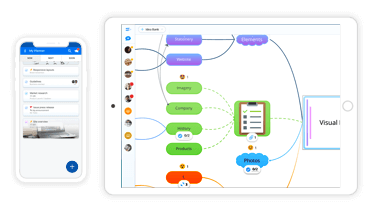
Yes! Ayoa is available to download on iOS (iPhone & iPad) and Android devices. This way you can enjoy idea generation and task management on the move, with exclusive offline capability. Visit our apps page to download. For more information regarding working offline, see the question below.

You can share your mind maps with anyone and everyone. Simply ask the people you’d like to share your map with to create an Ayoa account and invite them to your mind map. Depending on the permissions you’ve granted them, they’ll be able to view, edit, comment and add branches to your mind map.

Great news! You can import all of your existing maps from iMindMap into Ayoa. You can do this by selecting the ‘Import iMindMap IMX File’ from within the Ayoa Mind Map browser. You also have the option to import files from iMindMap Cloud. You can do this by logging into your Cloud account via Ayoa and then import your mind maps from iMindMap Cloud into Ayoa. Please visit our support guide for more information on how to do this.

Ayoa seamlessly syncs all of your work across the devices that you’re using. If you’ve created a board on your computer and want to access it on your phone, simply open the Ayoa app on your mobile device and ta-dah, your work will appear ready for you to edit.

Ayoa works with all modern web browsers – recent versions of Safari, Google Chrome or Firefox, and Internet Explorer 11+.

If you decide that you do not wish to renew your subscription, you can cancel the auto-renewal. See how.

If you have ADHD, you’ll know that keeping thoughts organised and staying on task can be genuinely hard work. Ayoa helps by giving your thinking somewhere to go – mind maps let you capture and connect ideas visually, while task boards break work down into steps with reminders and priorities to keep things moving. You can also reduce visual noise with information toggles and custom colour themes, so when you need to focus, the workspace works with you rather than against you.

Absolutely. Ayoa is built around visual thinking rather than text-heavy workflows, which makes a genuine difference for many users with dyslexia. You can organise ideas through mind maps, add images and audio alongside written notes, and adjust background colours and fonts to suit the way you read and process information best. You don’t need to adapt to Ayoa – it’ll adapt to you.

Ayoa gives you structure and clarity without being rigid. You can build visual routines, plan your work in a consistent format, and break complex tasks into steps that feel manageable rather than overwhelming. It’s designed to support independent working, while keeping the option open to collaborate with others whenever that’s useful. For many autistic users, having that level of control over how they work makes a genuine difference.

Ayoa is a DSA-approved tool, which means it can be recommended and funded as part of your needs assessment. If Ayoa has been included in your assessment, your funding body can cover the cost. If you’re a DSA needs assessor, or a student interested in the scheme, head to our dedicated DSA page for more info.

Yes. If you’re an employee with a disability or neurodivergent condition – including ADHD, dyslexia, or autism – the UK Government’s Access to Work scheme may be able to cover the cost of Ayoa as part of your assistive technology support. Visit our Access to Work page to find out more.


Access your work anywhere

Work anywhere, anytime. Ayoa offers complete flexibility with a selection of apps available to download for free.

Ayoa Web App

Web App

Launch App
Ayoa Mobile Apps

Mobile Devices

iPhone & iPad Android
0
Would love your thoughts, please comment.x
()
x