

September 1, 2018 (Updated March 8th, 2023)
Back to School made easy with DropTask

*PLEASE NOTE – DropTask is now Ayoa – an all-in-one tool for idea generation and collaboration, that goes beyond traditional task management. Discover Ayoa and achieve your best work.*
If you’re preparing for the start of a brand new school term, DropTask can help you manage your priorities and prepare your work in time for when the bell rings. Whether you’re organizing homework deadlines, or planning your lessons for the week, DropTask will help you to stay on top of your goals for a stress-free school year.
To help you jump back into classroom life, take a look below for 3 ways you can set yourself up for success this semester. Before you know it, you’ll be armed with the knowledge and tools you need to make this semester your most productive yet.
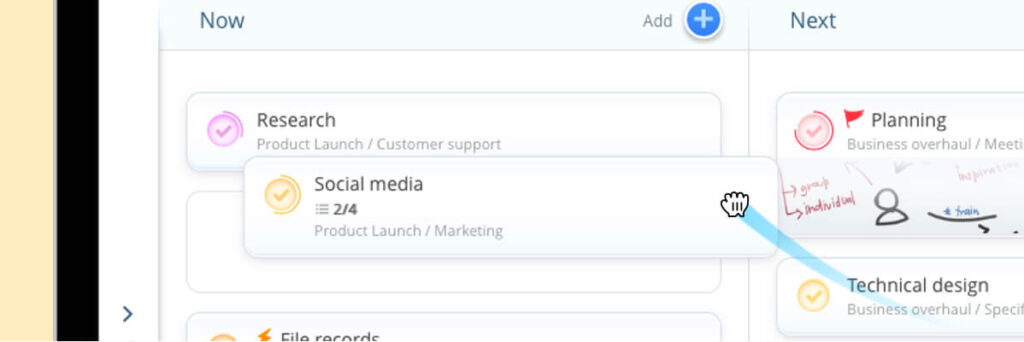
Manage priorities with your DropTask Planner
With the DropTask Planner, you can schedule your tasks in three simple boards: Now, Next or Soon. Breaking your to-do list into smaller chunks is a much more effective way to prioritize your work, so you can stay focused on the tasks that are most important. We all know that priorities can shift and new deadlines can crop up last minute – make quick changes as priorities move around by simply dragging and dropping your tasks onto a different board, so you can take control of your workload.
These simple boards are only visible to you, giving you your own space to organize your thoughts and tasks in a way you can understand. Say goodbye to your traditional to-do list, and use the DropTask Planner for the flexibility and ease to re-order and manage your tasks as priorities might change around you.

Use Projects to categorize your workload
DropTask’s Projects give focus to things that need to be done and allow you to categorize tasks and responsibilities into one productive workspace. Create your own private project to display your personal lesson plans or revision notes. Alternatively, invite students or classmates to a group project so you can easily work together on a project.
By creating a group project, you can further encourage teamwork and collaboration with discussions. Keeping your conversations and assignments together in one space will make it easier to work on your tasks as they develop, and maintain a seamless flow of communication with others. Easily send and receive comments and feedback by using the ‘@’ symbol within a specific task to mention your colleagues. When someone mentions you in a comment, you will receive a notification within the app, so you won’t miss any activity.

Stay on track with daily email summaries
Start your day on track and make sure nothing slips through the net. We’ll send you an email every morning to let you know which tasks you have to work on, as well as which ones are overdue, due today and due tomorrow. Within each task that you create, you can add due dates so we can send you these helpful reminders to ensure you’re always one step ahead of the game.
Want to add more to your tasks? When setting your due dates, you can also add extra details such as the level of importance, urgency and effort required for each task. There is also an adjustable progress bar, so you can specify exactly how far your task has left to completion.
New to Ayoa? Discover more and sign up today, and start achieving your best work.